
Get actionable ideas for accessibility findings
Understanding an issue is the first step. ScrollAccess AI can also suggest practical improvements to help you decide what to review or change in Webflow.
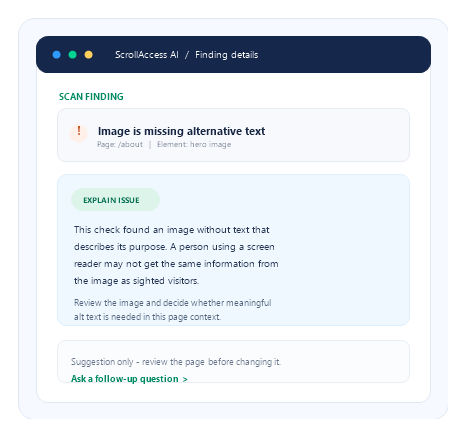
Use suggestions as a starting point
Review an issue in ScrollAccess and ask the AI assistant for a possible improvement. It may suggest clearer alt text or labels, a structural adjustment, or an HTML/CSS example.
01
Tailored to the finding
Suggestions are based on the details of the issue you select.
02
Examples to explore
See possible fixes you can adapt to your
own design.
own design.
03
A useful starting point
Get a head start on your review instead of a blank page.
04
Human review first
Nothing changes until you check it and
confirm.
confirm.
You stay in control
AI suggestions never change or publish your website on their own.
01
Review
Open a finding and ask for a suggestion.
02
Check
Compare it with your content and design.
03
Confirm
Approve any supported Designer change.
04
Rescan
Verify in context, publish via Webflow, rescan.
Frequently asked questions
Get answers about ScrollAccess, website accessibility scanning, AI powered guidance, accessibility tools, WCAG insights, and supported platforms.
AI-generated ideas for one selected finding, such as suggested wording or an example change.
No. You review them, confirm any Designer change, and nothing is auto-published.
Not always. Some findings lack detail and need manual investigation.
No. They can be incomplete or incorrect, so test before relying on them.
No. They guide individual findings and are not a certification or legal guarantee.
Check it in the page, publish via Webflow, rescan, and do manual checks.
Yes, HTML or CSS examples when relevant. Inspect, adapt, and test before use.
No matching FAQs found.